Saturday, February 21, 2009

Fix it Friday #3


The folks over at iheartfaces.com has a new Fix It Friday Post and this is what I came up with.
The above image is the original image for the "fix".
This is the image that I came up with. I basically blew out the luminosity of the image. Took a brush and got rid of the background and some of the subjects hood. Rotated the image just a bit and cropped. Thats it. pretty simple and quick. You can visit the folks at iheartfaces.com to see what they are up too.

Saturday, February 14, 2009

Happy Valentines Day (Love Wins - Really!)

My munchkins decided that our back door needed a little Valentines Day love. So they decided to make paper hearts and tape them to the glass on the doors. I thought they were very clever and colorful.  
The oranges heart in this picture says "Be Fancy". 
There is a lot of love going on in these hearts. 

And a few hugs. So for Valentines Day, be fancy, love one another, and give someone a hug. Remember, love wins, always!

Friday, February 6, 2009

Fix-it-Friday #1 (The Redheaded Beauty)

My buddy and fellow photog, Puna, sucked me into this Fix-it-Friday post. After reading her blog today, well, I just felt the challenge being laid down. The challenge is to make the image of the Redheaded Beauty look better than the one that came out of the camera. So, this is my attempt.
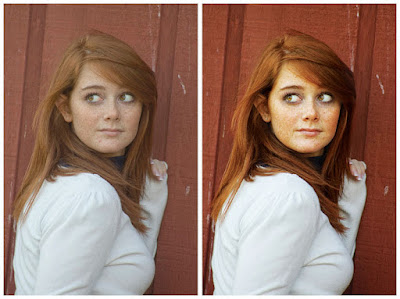
One the left you have the SOOC (Straight Out of the Camera) image. You can see its not a bad image. It's nicely composed, however, it feels a little flat. As a photographer, we don't want our clients feeling or looking flat. So, Photoshop CS3 to the rescue. The image on the right was "refined" in PS3. My first step, adjusting the levels (Command + L on a Mac, Control + L on a PC) a tad. Step 2: Getting rid of all the flaws (i.e. blemishes, stay hairs, etc) with either the Stamp Tool or Healing Brush. There is no reason for a beautiful model to have a zit when you can easily get rid of it. Step 3: Created a second layer and and gave it a "Screen" layer style. Then created a layer mask and painting back in the eyes. At this stage the eyes look really bad so I lowered that layers opacity to about 35% making the eye look bright and lively versus "evil". Then I flattened the image. Step 4: I duplicated the layer again and gave the new layer a a "Hard Light" layer style. Again, I made a mask and quickly painted back in her hair and face. Then I drop the opacity of that layer to about 40%. Step 5: Flatten the image one last time and "bam" done. Now, if you wanted to you could have kept all the layers and saved it as a Photoshop document. But for this exercise I just flattened mine.

Thanks to Puna for making me "Play" a little today. I also want to give some props to the folks over at "I Heart Faces" for coming up with this idea. I hope they get a ton of responses. Here is thier link go check them out.

Tuesday, January 20, 2009

Happy Inauguration Day


(designed by Shepard Fairey)

Best wishes to President Obama and his family. May the next 4 years in Washington, DC be memorable. 

Wednesday, January 14, 2009

Portraits - The Carter Family

The holidays are a great time to catch up with family you don't see very often. Trey and Julia stopped by our house for me to take their Christmas photos. Here are a couple of my favorites. They were great sports cause it was FREEZING outside!

This is their daughter. By that great smile she has, I believe that Mom and Dad will have their hands full. 

Thursday, January 1, 2009

Portraits - The Vinciguerra Family

During Christmas I was asked to take a family portrait for my Aunt Linda and her girls. Angie, her middle daughter, now lives in Florida and was up for the holiday. Since all the girls were together, I grabbed my camera bag and headed to their house.  
I think the Vinciguerra girls are absolutely beautiful (of course I am a little biased since they are related).  
They make my job as a photographer very easy.


I love the above set of photos. Each individual image was captured with natural light. I hope my Aunt can find a photo or two to hang on her walls. Thank you girls for letting me take your pictures. I love you.  

Giving is Awesome - Winner

A special thanks to all of you who sent in nominations for the "Giving is Awesome". I am sorry for the delay in posting the winner (please forgive me).  

The complimentary custom portraits goes to: Karen Schatz. Karen is a single mom who home schools her son Cody. She runs her own business and is an active part of her community and serves on several church ministries.

I can’t wait to work to work with Karen and her son. Thanks again and I hope everyone has a very Happy New Year!